Adsense Daemon is a WordPress plugin that is used to integrate “Google Adsense” into blog content easily.
I had used few Google Adsense WordPress plugins, and found out many of those will hijack and replace my Google Adsense code with theirs. This inspired me to create this simplest solution to integrate Google Adsense into blog content.
Just copy your Google Adsense code, paste it and configure how and where you want to display. It’s will directly display what you put into the template box.
Features
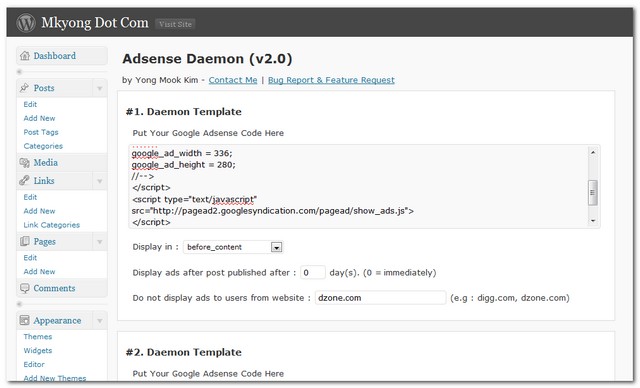
Setup screen provided to let user choose where user want to display the Google Adsense. With following features :
7 pre-define display options.
- Left Float Content
- Right Float Content
- Before Content
- After Content
- After 1st paragraph
- After 2nd paragraph
- Random paragraph
Misc features
- Display only for posts published after xx days. (configurable).
- Do not display it to users from certain website e.g digg.com (configratable).
Download Here
Adsense Daemon v2.2 (Latest)
Adsense Daemon v2.1
Adsense Daemon v2.0
Adsense Daemon v1.2
Changed Log
Adsense Daemon v2.2 – 22/06/2010
– Make it compatible with WordPress 3.0
Adsense Daemon v2.1 – 18/04/2010
– Add disable function for certain post and category
– Add more option for after para 1 to 10 (hard code)
– Add #4 ads space
– All methods append ad_ to avoid conflict issue
Adsense Daemon v2.0 – 05/04/2010
– Plugin redesign for more features
– Display ads after certain date
– Do not display ads from certain sites
Adsense Daemon v1.2 – 26/09/2009
– fixed : Check in a wrong version into WordPress
Adsense Daemon v1.1 – 26/09/2009
– Tag point to wrong folder in WordPress plugin directory
– Release a new version and point to correct directory
How to use
- After activated, click “setting – Adsense Daemon” to access the setup screen.
- Get Google Adsense ads HTML code from Google site, and put it into the template box.
- Select the display option.
- Saved.
I will truly appreciated if you can share your invaluable idea to me.

I am getting an error on my website: Warning: A non-numeric value encountered in /home/MYWEBSITE/wp-content/plugins/adsense-daemon/Adsense-Daemon.php on line 243
Not sure what to do with this – can you assist?
I will this plugin because this is effective
The amount you’ll earn also depends largely on the amount of targeted traffic you receive to your own site, how well the ads match your audience’s interests, the placement of the ads on your pages, and of course the amount you receive per click.-
My own blog page
http://caramoantourpackage.com
i have this plugin for other blog Adsense Daemon, i think this is great plugin.. thank you.. good article..
The plugin is not working on Pink Touch 2. Any ideas how to make it work ?
Great plugin indeed
But I’m having one problem. When I publish a new post ads are shown, but after 10 or 20 minutes they just disappear from posts
Any sugestion?
Adding some features such as
is good idea, i guess..
Thanks for the great plugin. Its simple and very easy to use. I started using it for my website http://www.startupfreak.com
I have one feature request,
Can i add random ads after N paragraph. This will help me to have a dynamic look for the website.
On our website, i enabled 336×280 to appear after the 1st paragraph. But I would love to have different ads sizes to appear.
i am getting 412 error on clicking on save button
which wordpress version are you using ? It works well for me in 3.3.2
Hi there,
First of all this plugin is something I really liked, for its simplicity and great features. However I am wondering, what if I want to show ad after 20th paragraph? Where can I edit that line of code/s and if you could incorporate a feature of entering desired number for the paragraph setting in near future? Thank you for your precious time and support. Really appreciate it. Looking forward to your reply.
Yes, i will allocate more time on it, and i need some features for this plugin also, so, i will release a new version soon 🙂
Plugin works fine as long as displaying adsense ads before content, after content, left stretch, right stretch are concerned. But when it comes to displaying inside paragraph, it’s not working.
Hi,
The plugin is the best one from a list of other plugins i’ve tried already.
There is just one more question. It will be nice to have a possibility to arrange the code not only after the second paragraph, but also on the right or left side. For example I’m using the 210×240 dimension code. I could place it on the right side just on the top of the text. At the same time, in the left corner I’ve already the image of the article. So, placing the code on the right side after the second paragraph, for example, will be not only in the centre of the text, but also will look nice and more acceptable for the readers.
Best regards,
Victor
You can try this. Wrap your code with right float manually style=”float:right”, and select display after param2.
I’ve use this plugin for my blogs. I say thank’s for this great plugin.
I just have a same question with @Victor and I’ve try to add the html code for the float style(left or right), but it doesn’t work. What html tags may I use to make it work?
Oh, great. I use the “div” tag, and it works!
Really thank you mkyong for your suggestion and this great plugin.
Regards.
Good to know that
Great Plug-In
first time I use this ..
very usefull
Thanks mkyong 😉
you really need to add “top” to add positions. Top is a very popular position 🙂
“top” means just above
… just above the div with id header
I have implemented this plugin, which is amazing.
Only problem is it shows only to posts.
I would like the ad appear from categories as well.
Can you add in that please.
or let me know, how to ad the code to category pages.
Thanks
Sample contracts
Not working anymore! Only is there no more adsense in the post. And I did not install any plugin that can create conflict. Why?
i have used the Adsense Daemon and activated but i could not know how to give the google adsese code and configure? shall i know where is the menu to configure?
In WP admin, “Settings” –> “Adsense Daemon”
You have “Download here” written near the top of this page with a Google ad under it. Google can close your account for misleading people into clicking on ads.
You’re own plugin will become of no use to you.
Thanks for your advice, really appreciated it.
I used your plugin and My site has on Google ads. I noticed theres is no action there in my adsense report.When I go To analytics it says the site is not receving adsense ads why is this so. I noticed it this on another side using another plug in too
Does not seem to be working with the theme Alltuts.
See my blog.
Wordpress version 3.1-alpha
Hi, I’m using adsense daemon for WP 3.0.1 for several time, and I’m enjoy it.
But, tonight I’ve found that my ads not appear using this plugin at “after content” at the date of post, I means immediately after I have post an article, I view my post and I’ve not found my ads (only at after content), but it will appear at the day after, then.
What’s wrong?
Thx – Sincerely
Did you configure any values in this option?
Display ads for post published after : default is 0.
Waiting for the right float, left float features to be enabled between paragraphs … Will upgrade as soon as it’s available
Nice Plugin, but i want to add adsense in the sidebar
Hello, I have used your plugin and i really liked this. I want to ask you how can i add left or right float ads in paragraphs eg i want to add right float ad in 3rd paragraph. I hope you can help. Thanks
hoho, it’s not support yet, nice suggestion, i will include it in future release.
Hello Mkyong..thanks for the reply..I am waiting for the update 🙂
you have nice blog thanks for this wordpress plugin
Thanks for the plugin, it worked, i’ll always consider it
This plugin has made our work soo easy… Now everything is just a click away.
Thanks for sharing it
Esha
Indeed, a great plugin, congratulations for it. Just a question now: why the ads are shown only on inner pages(individual posts) but not on home page ? I use excerpts for the home page displaying the excerpts for 10 posts, can be this a reason ? Thanks !
Currently, it’s not display in the excerpts mode. btw Google is limited to 3 Adsense ads only, it’s really not make sense to display it in homepage, unless you have a very strong reason to do so.
Hi,
Just wanted to let you know this is one of the best adsense plugins I have ever used!
Thanks…and keep up the good work!
Alex.
This might actually work for me – is there a way to only display certain ads in posts, depending on the author? Such as, #1 Daemon Template will only show in posts from Author #1, #2 Daemon Template only shows in posts from Author #2, and so on. Is this doable?
Absolutely, thanks for your idea, will implement it in future.
Wow – thanks! If you can actually get it to work, that would be amazing. Seriously; I’ve been trying to accomplish this and every single plugin has failed me. Thank you again!
I installed this plugin and getting following error when click on “Adsense Daemon”
“You do not have sufficient permissions to access this page.”
I am using WordPress 3
Folder permission for the AdsenseDaemon is 755… Files inside was having 644… I even changed those file permissions to 755 … but still it doesn’t work.
v2.2 released, for WordPress 3.0 compatible
Ok. I just changed the file permissions of “Adsense-Daemon.php” to 755 again and it worked 🙂
I just upgrated the plugin from Admin but still it shows same error