In Android, you can use Intent.ACTION_SEND to call an existing email client to send an Email.
See following code snippets :
	Intent email = new Intent(Intent.ACTION_SEND);
	email.putExtra(Intent.EXTRA_EMAIL, new String[]{"[email protected]"});
	email.putExtra(Intent.EXTRA_SUBJECT, "subject");
	email.putExtra(Intent.EXTRA_TEXT, "message");
	email.setType("message/rfc822");
	startActivity(Intent.createChooser(email, "Choose an Email client :"));
P.S This project is developed in Eclipse 3.7, and tested with Samsung Galaxy S2 (Android 2.3.3).
Run & test on real device only.
If you run this on emulator, you will hit error message : “No application can perform this action“. This code only work on real device.
If you run this on emulator, you will hit error message : “No application can perform this action“. This code only work on real device.
1. Android Layout
File : res/layout/main.xml
<?xml version="1.0" encoding="utf-8"?>
<LinearLayout xmlns:android="http://schemas.android.com/apk/res/android"
    android:id="@+id/linearLayout1"
    android:layout_width="fill_parent"
    android:layout_height="fill_parent"
    android:orientation="vertical" >

    <TextView
        android:id="@+id/textViewPhoneNo"
        android:layout_width="wrap_content"
        android:layout_height="wrap_content"
        android:text="To : "
        android:textAppearance="?android:attr/textAppearanceLarge" />

    <EditText
        android:id="@+id/editTextTo"
        android:layout_width="fill_parent"
        android:layout_height="wrap_content"
        android:inputType="textEmailAddress" >

        <requestFocus />

    </EditText>

    <TextView
        android:id="@+id/textViewSubject"
        android:layout_width="wrap_content"
        android:layout_height="wrap_content"
        android:text="Subject : "
        android:textAppearance="?android:attr/textAppearanceLarge" />

    <EditText
        android:id="@+id/editTextSubject"
        android:layout_width="fill_parent"
        android:layout_height="wrap_content"
         >
    </EditText>

    <TextView
        android:id="@+id/textViewMessage"
        android:layout_width="wrap_content"
        android:layout_height="wrap_content"
        android:text="Message : "
        android:textAppearance="?android:attr/textAppearanceLarge" />

    <EditText
        android:id="@+id/editTextMessage"
        android:layout_width="fill_parent"
        android:layout_height="wrap_content"
        android:gravity="top"
        android:inputType="textMultiLine"
        android:lines="5" />

    <Button
        android:id="@+id/buttonSend"
        android:layout_width="fill_parent"
        android:layout_height="wrap_content"
        android:text="Send" />

</LinearLayout>
2. Activity
Full activity class to send an Email. Read the onClick() method, it should be self-explanatory.
package com.mkyong.android;

import android.app.Activity;
import android.content.Intent;
import android.os.Bundle;
import android.view.View;
import android.view.View.OnClickListener;
import android.widget.Button;
import android.widget.EditText;

public class SendEmailActivity extends Activity {

	Button buttonSend;
	EditText textTo;
	EditText textSubject;
	EditText textMessage;

	@Override
	public void onCreate(Bundle savedInstanceState) {
		super.onCreate(savedInstanceState);
		setContentView(R.layout.main);

		buttonSend = (Button) findViewById(R.id.buttonSend);
		textTo = (EditText) findViewById(R.id.editTextTo);
		textSubject = (EditText) findViewById(R.id.editTextSubject);
		textMessage = (EditText) findViewById(R.id.editTextMessage);

		buttonSend.setOnClickListener(new OnClickListener() {

			@Override
			public void onClick(View v) {

			  String to = textTo.getText().toString();
			  String subject = textSubject.getText().toString();
			  String message = textMessage.getText().toString();

			  Intent email = new Intent(Intent.ACTION_SEND);
			  email.putExtra(Intent.EXTRA_EMAIL, new String[]{ to});
			  //email.putExtra(Intent.EXTRA_CC, new String[]{ to});
			  //email.putExtra(Intent.EXTRA_BCC, new String[]{to});
			  email.putExtra(Intent.EXTRA_SUBJECT, subject);
			  email.putExtra(Intent.EXTRA_TEXT, message);

			  //need this to prompts email client only
			  email.setType("message/rfc822");

			  startActivity(Intent.createChooser(email, "Choose an Email client :"));

			}
		});
	}
}
3. Demo
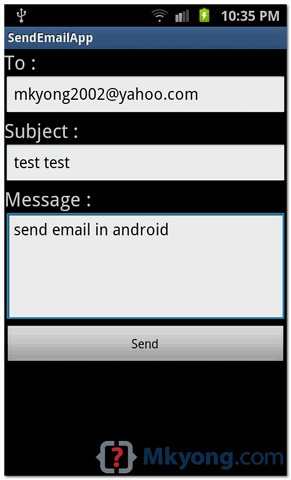
See default scree, fill in the detail, and click on the “send” button.
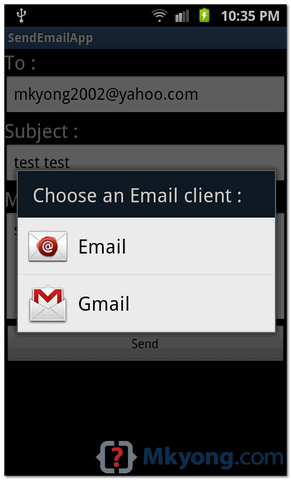
It will prompts your existing Email client to select.
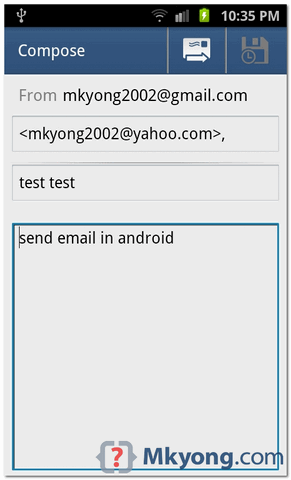
In this case, i selected Gmail, and all previous filled in detail will be populated to Gmail client automatically.
Note
Android does not provide API to send Email directly, you have to call the existing Email client to send Email.
Android does not provide API to send Email directly, you have to call the existing Email client to send Email.
Download Source Code
Download it – Android-Send-Email-Example.zip (16 KB)

Magnificent site. Plenty of useful information here. I’m sending it to some friends ans additionally sharing in delicious. And certainly, thanks in your sweat! kadfcdeddgecdbeb
Wow Incredible!
thanks for share your information,This info is very useful for me
I prefer to use an exist sender account to send email
Thank you for sharing, but i have a question. How to make a confirmation before we send an e-mail? Like AlertDialog?
Can anyone tell me that how can I send the mail with out the use of Gmail or Email app.
Means other app like Gmail but do not use Gmail or Email???
thank you for your Examples is very useful to me.
I prefer to use an exist sender account to send email , I do not expect APP user know how to setup their sending account , please help me to build the source code that send mail directly , instead of Via mobile client mailbox.
Thanks for sharing.
Very Use Full
Thank you for this, so much. I am a beginner android developer. How would I add an option to send picture attatchments with the email?
Nice tutorial.Plz post Tutorial on how to send email with attachments.
Intent intent = new Intent(Intent.ACTION_SEND);
intent.setType(“text/plain”);
intent.putExtra(Intent.EXTRA_EMAIL,
“[email protected]”);
intent.putExtra(Intent.EXTRA_SUBJECT, “Subject”);
intent.putExtra(
Intent.EXTRA_TEXT,
“attachment”
startActivity(Intent.createChooser(intent, “Send Email”));
How to send an email with attached files?
Wow Incredible!
using real devices also it shows the same error,”No application can perform this action“;
great tutorial ! would like to add an attachement to the mail. How do i handle that?
I used startActivityForResult to send the mail but getting result code as 0 everytime, even when the mail is received by the recepient. How can i get the correct result code.
How to send an e mail from a application without using “create choose”r (G mail as default) by calling intent??
Hi, my message body is a TableLayout not a text view how can i do that ?
hi,
your examples very useful to me.
thank you for sharing your knowledge.
hey its work fine but its not getting the to,subject,message field to the gmail to,subject,message field can any one just help me to sort it out
hi i want a mail app with any mail client.i dont have any applications in device.can tell me how can i implement it.
How do it know your email address?I can see another email address but yours can’t.
hi how to create live wallpaper for android plz give example
Thanks!! it really helped!!
error after clicking send button chose an email client :
no application can perform this action plzz help thanks
You should try this on a real device because the emulator won’t be able to start the activity.
Hi,
can any one tell me how can i set the Email client for this application.
Hi
thanks very much, excellent tutorial. works really well. however is it possible to have numerous message fields in place of just the one message text area. I was hoping that the user would be able to populate numerous fields and when the email was read by the recipient the messages would be read as one full message.
thanks in advance
Dave
hey how can i change the target device..my phone i android 2.2.1… and it is not running on that. how do i solve that?
thank you very much 🙂
i waant to get senders email address from recieved mail.how can i get that ?
Nice and Awsome Tutorials..Thumbs up!
Hi.
When click on the send button I only can choose Gmail and not my regular mail client
thats really awsome thx so much dude ..!
amazing sit.great help! thanks 🙂
How to save the form data in database when button is clicked?
and that form data have to be mailed to admin.
Hey Mate,
You are doing such an awesome job and I really appreciate that. I need some help from you. Can you please tell me how can I create a function that will forward my sms to an email ID?
Thanks,
Ali
[email protected]
me also got the output….
why the app generate error when i use 1.6 version of sdk
its really awsme….i get the output try to put some more apps
hi i want to send mail with CC . and CC ID should be sender’s id. so it can be any either gmail of email so how i get it . can you help me about that .
i have try with accounmanager with GET_ACCOUNTS permission in manifest.
referance :
http://stackoverflow.com/questions/2112965/how-to-get-the-android-devices-primary-e-mail-address
This is g8 site where i have been learning so many things regarding java, android with in easy manner and example also. I think this is r8 way to teach. And you have been working hard to do so. Thanks a lot.
Can you please make a tutorial for sending email with attachment ?
Thanks
Hello sir gr8 tutorial for but it would be greatful if u post one of the code how to send e-mail with attachment..
hi,
can you please tell me how to run android app always on background.
i am trying to listen all incoming sms and calls..
thank you..
Hey MKYong,
I just added few features to the ‘Email’ application like validation, enhanced form submission etc., Here is the post: http://android.programmerguru.com/simple-email-activity/. Welcome your comments!
nice website….!!
Thanks for the tutorial.
Do we have to make changing in android manifest file too?
Hello can you tell me how can I send html through email, with some style defined into span????
I have read a lot of forums they simply talks about tagHandler but their is very less information regarding this on internet.
If I only have one email client on the device the chooser does not appear, it goes straight to the one and only email client configured. That is fine. The problem is Intent.createChooser() has an IntentReceiver that is leaking and fills logcat with error messages. This works fine on the emulator if I configure the email client. Is there a way to startActivity() without calling Intent.createChooser()?
hi thanks for this code, that’s useful.
But I have a question, there is some way of automatically sending??
Ay chooseb an email client:
I am getting an exception as “No apllication can perform this action”….
Is it possible to send a mail using this app code?
This code only collect your fill in form data and pass it to your existing email client in your phone. Please choose an email client which is able to send email.
I tried this email.setType(“message/rfc822”), but it shows skype with other email clients.. Hoe remove skype from there ?
Deal with it
Use to send only via Email client this code
Intent email = new Intent(Intent.ACTION_SENDTO, Uri.fromParts(“mailto”, “mail_to_send”, null));