Android’s WebView allows you to open an own windows for viewing URL or custom html markup page.
In this tutorial, you will create two pages, a page with a single button, when you clicked on it, it will navigate to another page and display URL “google.com” in WebView component.
P.S This project is developed in Eclipse 3.7, and tested with Android 2.3.3.
1. Android Layout Files
Create two Android layout files – “res/layout/main.xml” and “res/layout/webview.xml“.
File : res/layout/main.xml
<?xml version="1.0" encoding="utf-8"?>
<LinearLayout xmlns:android="http://schemas.android.com/apk/res/android"
    android:layout_width="fill_parent"
    android:layout_height="fill_parent"
    android:orientation="vertical" >

    <Button
        android:id="@+id/buttonUrl"
        android:layout_width="wrap_content"
        android:layout_height="wrap_content"
        android:text="Go to http://www.google.com" />

</LinearLayout>
File : res/layout/main.xml – WebView example
<?xml version="1.0" encoding="utf-8"?>
<WebView  xmlns:android="http://schemas.android.com/apk/res/android"
    android:id="@+id/webView1"
    android:layout_width="fill_parent"
    android:layout_height="fill_parent"
/>
2. Activity
Two activity classes, an activity to display a button, another activity display the WebView with predefined URL.
File : MainActivity.java
package com.mkyong.android;

import android.app.Activity;
import android.content.Context;
import android.content.Intent;
import android.os.Bundle;
import android.view.View;
import android.view.View.OnClickListener;
import android.widget.Button;

public class MainActivity extends Activity {

	private Button button;

	public void onCreate(Bundle savedInstanceState) {
		final Context context = this;

		super.onCreate(savedInstanceState);
		setContentView(R.layout.main);

		button = (Button) findViewById(R.id.buttonUrl);

		button.setOnClickListener(new OnClickListener() {

		  @Override
		  public void onClick(View arg0) {
		    Intent intent = new Intent(context, WebViewActivity.class);
		    startActivity(intent);
		  }

		});

	}

}
File : WebViewActivity.java
package com.mkyong.android;

import android.app.Activity;
import android.os.Bundle;
import android.webkit.WebView;

public class WebViewActivity extends Activity {

	private WebView webView;

	public void onCreate(Bundle savedInstanceState) {
		super.onCreate(savedInstanceState);
		setContentView(R.layout.webview);

		webView = (WebView) findViewById(R.id.webView1);
		webView.getSettings().setJavaScriptEnabled(true);
		webView.loadUrl("http://www.google.com");

	}

}
3. Android Manifest
WebView required INTERNET permission, add below into AndroidManifest.xml.
<uses-permission android:name="android.permission.INTERNET" />
File : AndroidManifest.xml – See full example.
<?xml version="1.0" encoding="utf-8"?>
<manifest xmlns:android="http://schemas.android.com/apk/res/android"
    package="com.mkyong.android"
    android:versionCode="1"
    android:versionName="1.0" >

    <uses-sdk android:minSdkVersion="10" />

    <uses-permission android:name="android.permission.INTERNET" />

    <application
        android:icon="@drawable/ic_launcher"
        android:label="@string/app_name" >
        <activity
            android:name=".WebViewActivity"
            android:theme="@android:style/Theme.NoTitleBar" />

        <activity
            android:label="@string/app_name"
            android:name=".MainActivity" >
            <intent-filter >
                <action android:name="android.intent.action.MAIN" />
                <category android:name="android.intent.category.LAUNCHER" />
            </intent-filter>
        </activity>
    </application>

</manifest>
4. Demo
By default, just display a button.
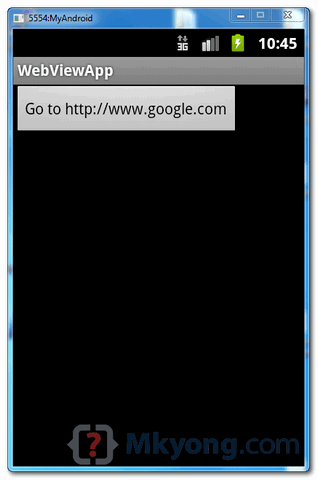
Click on button, WebView is display.
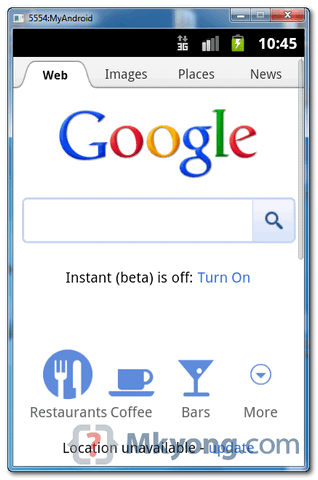
5. Demo, Again
WebView allow you to manually load custom HTML markup, via webView.loadData(), see modified version :
package com.mkyong.android;

import android.app.Activity;
import android.os.Bundle;
import android.webkit.WebView;

public class WebViewActivity extends Activity {

	private WebView webView;

	public void onCreate(Bundle savedInstanceState) {
	   super.onCreate(savedInstanceState);
	   setContentView(R.layout.webview);

	   webView = (WebView) findViewById(R.id.webView1);
	   webView.getSettings().setJavaScriptEnabled(true);
	   //webView.loadUrl("http://www.google.com");

	   String customHtml = "<html><body><h1>Hello, WebView</h1></body></html>";
	   webView.loadData(customHtml, "text/html", "UTF-8");

	}

}
Now, when button is clicked, a custom html page is displayed.
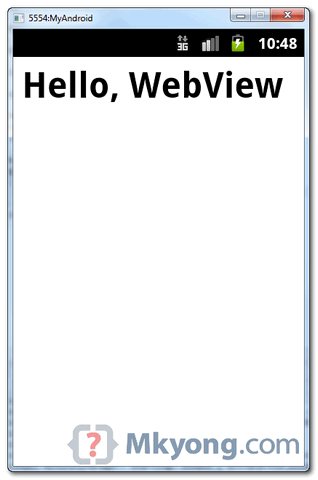

zip file isnt getting downloaded
Thank you soo much it really helped me a lot
Kind Sir, how do we simply skip directly to the web page (without a button)?
Thanks in advance!
One button code ok….more than 6 button in single webview page activity
plzzzzzzzz upload webview with download file audio image video, this webview could not working downloads
sir this content is innovative and helpful so thank you so much for sharing it.
Hello sir
ThAnkyou for this tutorial,
I have a question-
Main actvity XML file have 2 buttons frist btn click then open browser activity and show web page I m set a url in browser activity .But
How to set second button to load diffrent url in same browsers activity
Plz sir reply
Waiting for your reply
Thank you
how to enable cookies in webview for android ?
just managed to do it
WebView myWebView = (WebView) findViewById(R.id.wv1);
myWebView.setWebViewClient(new WebViewClient(){
@Override
public boolean shouldOverrideUrlLoading(WebView view, String url){
view.loadUrl(url);
return true;
}
});
WebSettings webSettings = myWebView.getSettings();
webSettings.setJavaScriptEnabled(true);
webSettings.setDomStorageEnabled(true);
myWebView.loadUrl(“website url here/”);
I need The Apk of the sample zip you provided. Please Build the app and provide apk.
Im new for this. Now I want to send push notification to my WebView App. Please, Can you explain like this?
hey mkyong,
first of all a big thank you made my day with these android tutorial,
secondly you have a small mistake,
please change the name of
File : res/layout/main.xml – WebView example
to be
File : res/layout/webview.xml – WebView example
im i right.?
I also was slightly confused by this and realized the error.
Find more webview tutorial here
Why not take a look at my blog about how to create an Android app that displays an Image in an ImageView control of the main Activity at the full width of the screen.
The app uses the following Android SDK objects:
. ImageView
. LinearLayout
. Bitmap
. Activity
. XML layout
. LayoutParams
. Display
Also:
. layout_width
. layout_height
. id
. orientation
. vertical
. match_parent
XML attributes and values are covered.
Click the link BELOW! to see
http://androidprogrammeringcorner.blogspot.com/2015/06/pak-longs-android-programming-corner.html
hi I need use text in web view for ex. a story for reading thank u .
Thanks for the code…….it helped!
when i click on button it give me FC error guys help me out 🙁
hi if i wanna create login page using html and java as code, is it possible?how i send user id n pass from html to java, thx alot
I am following the same steps…but when i trying to export it automatically deletes the internet permession line…..and because of that…application doeant run….qhat should i do…why this is happening…?
hi, i’m new in android programming, i’m getting error when i create webViewActivity.java
the error is : webview cannot be resolved or is not a field, i try to create that field but not help
here is screen capture: http://postimg.org/image/bhvcqfh39/
i hope you can help me, thanks
Android tutorial
https://www.youtube.com/watch?v=iXvbv5bSbaY
nice tutorial.. (Y)
yeap
One word. Awesome!
Hi,
I need help with a large text string in string.xml but it shows only the first page but the rest of the text doesn’t show at all. Any tips? — ScrollView is not helping or maybe I am doing something wrong there. Help!
Thanks! Short and Sweet article…
Chek it man your code is not running. you skip one line here…
add this line in your code……
webView.setWebViewClient(new WebViewClient());
Right shariq ! I’ve done same thing to make the webview able to navigate properly !
Yes! The code would try to run the website in the device’s internet browser without this code. Thanks!
Thanks for the info
Super B 🙂
Hi, thanks for your tutorial. How i do for to hide status bar when i run my app?
is it possible to build a java web app such as this in android? how much do you think it would cost? thanks!
Mk Kong rocks!
Mk Yong* 🙂
Thank you….
Perfect Example Thanks
The new webview is a mess (in kitkat). html5 canvas is not hardware accelerated and rendering performance is extremely poor. All games/apps which rely on canvas rendering are slowed down to death. There are multiple bugs raised, but google is completely silent on this mishap.
slow canvas bug :
1. https://code.google.com/p/chromium/issues/detail?id=315111
2. https://code.google.com/p/chromium/issues/detail?id=239864
slow css transformation :
https://code.google.com/p/chromium/issues/detail?id=329108
other issues :
https://code.google.com/p/android/issues/detail?id=62378 (text wrap bug)
https://code.google.com/p/android/issues/detail?id=62220 (broken filechooser)
The problems are so severe that developers are crying foul and asking the old webview back
https://code.google.com/p/android/issues/detail?id=62293
Hi I am having a problem with this line in MainActivity class
setContentView(R.layout.main);
the R class does not define main?
Any clues?
You need to create a layout file called main in your layout folder (res/layout/main.xml)
Thank you man! Great tutorial!
Hi, was wondering if someone could help on this – http://stackoverflow.com/questions/20070732/android-metaio-arel-launch-url-in-app-and-not-external-browser
Hello,
Thanks for the tutorial. Based on it I have built a small app that fills user and password on a form that is loaded in the webview, I got it working until I tried to add unsuccessfully a DownloadManager to download attachments. It’s not working now on the phone but oddly eclipse Emulator does work. Here is my code:
Main activity
import android.app.Activity;
import android.content.Context;
import android.content.Intent;
import android.os.Bundle;
import android.view.View;
import android.view.View.OnClickListener;
import android.widget.Button;
import android.widget.EditText;
public class MainActivity extends Activity {
private EditText user;
private EditText pass;
private Button button;
public void onCreate(Bundle savedInstanceState) {
final Context context = this;
super.onCreate(savedInstanceState);
setContentView(R.layout.main);
user = (EditText) findViewById(R.id.editText1);
pass = (EditText) findViewById(R.id.editText2);
button = (Button) findViewById(R.id.buttonUrl);
button.setOnClickListener(new OnClickListener() {
@Override
public void onClick(View arg0) {
Intent intent = new Intent(context, WebViewActivity.class);
intent.putExtra(“username”, user.getText().toString());
intent.putExtra(“password”, pass.getText().toString());
startActivity(intent);
}
});
}
}
Webview activity
import android.app.Activity;
import android.os.Bundle;
import android.webkit.WebSettings;
import android.webkit.WebView;
import android.webkit.WebViewClient;
public class WebViewActivity extends Activity {
private WebView webView;
@Override
public void onCreate(Bundle savedInstanceState) {
super.onCreate(savedInstanceState);
setContentView(R.layout.webview);
final Bundle bundle = getIntent().getExtras();
webView = (WebView) findViewById(R.id.webView2);
webView.getSettings().setJavaScriptEnabled(true);
webView.getSettings().setBuiltInZoomControls(true);//Version 2
webView.loadUrl(“https://xxx.yyyyyy.zzz”);
//WebSettings mWebSettings = webView.getSettings();
//mWebSettings.setSavePassword(false);
//mWebSettings.setSaveFormData(false);
webView.setWebViewClient(new WebViewClient()
{
@Override
public void onPageFinished(WebView view, String url)
{
String us = bundle.getString(“username”);
String ps = bundle.getString(“password”);
webView.loadUrl(“javascript: {” +
“document.getElementById(‘username’).value = ‘”+us+”‘;” +
“document.getElementById(‘password’).value = ‘”+ps+”‘;” +
“var frms = document.getElementsByName(‘logonForm’);” +
“frms[0].submit(); };”);
}
});
}
}
Any idea of why is not working on the mobile phones?
Thanks in advance
You can use the following web browser……….
https://www.andapponline.com/android/application/surfen-mini-w
Does it mean we can get the the web app directly on a mobile app.
Many Thanks, Got three Apps made around this tutorial for my grateful clients having no previous android experience.
You da bomb!
thanks for code
Good Code also working…
Thanks for sharing…
I want automatically replace css file when onpagefinished. Manually replace css with javascript i dont want, because my css file have over 2000 lines. I simply want set css to Webview. How make it?
Thanks for the very clear WebView tutorial too.
Unfortunately the code doesn’t work for me!
When I try to compile it I get the following error:
C:\…..\WebViewActivity.java:26: error: cannot find symbol setContentView(R.layout.webview);
^
symbol: variable webview
location: class layout
1 error
Can you help me to fix that?
Thank you very much.
I’ve found the error:
You wrote “Create two Android layout files – “res/layout/main.xml” and “res/layout/webview.xml“.” but I skipped that and as the label of the “res/layout/webview.xml“ code you wrote: “res/layout/main.xml – WebView example” instead of “res/layout/webview.xml – WebView example” I added the webview.xml code to main.xml!
Anyway the code doesn’t work yet!
It works!
I was using the app to connect a site with index.php. Adding to “www.sitename.com” that index: “www.sitename.com/index.php” fixed the “problem”!
Thanks.
hey please help me,
How can i pass a varibale to the URL, at the moment i am not calling my html code but i also want to pass a value to it.
thanks
sai
thanks for the code
can you please give me the code to add progress bar for this webview code??
Hi
If you want to use a text a few key What should we do?
Joining the local chamber of commerce or civic association can provide the opportunity to
network with many local business people. Try to maintain pages will
be lighter, especially the main page (homepage). Most webmasters, especially novice
ones continue to think that there is some magical piece of
software which will bring in tons of traffic and money.
Hi ALL,
How can i pass a varibale to the URL, at the moment i am calling my html code but i also want to pass a value to it.
thanks
sai
If you program the way you write articles, never a program will work.
Javascript not working with this, though i think it is enabled … what could be the problem…
try this—>
webview_variable.getSettings().setJavaScriptEnabled(true);
Hello sir how to display latex string in webview ?using mathjax plz hellp me
thank you very much all codes are working well
thank you
hello sir I want to give print command to my output how can i give it… the java script code function window.print() does’nt give me the dialog box of available printer
String customHtml = ” window.print() Menu Order “;
if want to print the output to the local printer how can i do it.. window.print() java script function doesn’t work..
plz help me out with source code
i ve downloaded ur code & run it but it displays only second screenshot posted above not d first wer it displays google.com homepagwhat to do..???
plz help
Hey! i’ve downloaded your project & tried it onto Eclipse. There is a problem, when i click
it starts the default Android Browser… Please help me out!!
webView = (WebView) findViewById(R.id.webView1);
webView.getSettings().setJavaScriptEnabled(true);
// this is set webview in ur activity
webView.setWebViewClient(new WebViewClient());
webView.loadUrl(“http://www.google.com”);
Hi i have html form with input type=”radio” but cant view it in webview
other things are visible of table
Hi,
A bit cheeky this one 🙂 – please could you provide me with code (and its location – filename) that I can use to launch a url. I have created the graphics – just need to launch the url when icon selected.
Many thanks
Lester
Hi,
I want to draw something on WebView. How can i acheive that? Please help
Kinda new with Android, but was wondering how do I skip the “press button to go to app” and just directly go to WebView function. Thank you
yaa
how is that ?
Hi. Excelent example, many thanks, now one question… Im have a webpage and like the application load my Webpage, then modidy the url in webView.loadUrl(“”); and load fine. Now the problem is when make click in any link of the my Web because my application launch the Navigator and not open the webpage into my app. How can make this? Load only in my app my Webpage? Thanks for your help
you need to override the default application that handles URLs. you can do this by adding this 2 lines to your WebViewActivity.java class.
Very useful is this Your tutorial. Thank you. And maybe You know a way to webChromeClient?
Hi am getting this error when i am launch the webview from listview activity.
See interesting thing is when i am try to launch webview two or three time it’s work fine. After am getting this error. Please give me perfect solution .
All ideas are welcome
thanks, I was looking for that second method.
Thanks for the WebView tutorial too. I managed to solve 2 things in a day because of your tutorials. 🙂
sir
please, tell me how to i use hyperlink ….by which i can connect with from list view to webview. (for read pdf material)
So you could set up an html form in a WebView but how do you collect user responses in your Android code? it exists anything similar to request.getParameter() in Android?
thanks!!
can i return first application with “back” button in the second application? If I can, how?
How to set the captured image in Android phone as wallpaper programatically??
Take a look at this post:
http://android.programmerguru.com/simple-camera-activity/
WebView.java
package org.example.webviewdemo;

import android.app.Activity;
import android.os.Bundle;
import android.view.KeyEvent;
import android.view.View;
import android.view.View.OnClickListener;
import android.view.View.OnKeyListener;
import android.webkit.WebView;
import android.webkit.WebViewClient;
import android.widget.Button;
import android.widget.EditText;

public class WebViewDemo extends Activity {
	private WebView webView;
	private EditText urlField;
	private Button goButton;

    /** Called when the activity is first created. */
    @Override
    public void onCreate(Bundle savedInstanceState) {
        super.onCreate(savedInstanceState);
        setContentView(R.layout.main);

        // Create reference to UI elements
        webView  = (WebView) findViewById(R.id.webview_compontent);
        urlField = (EditText)findViewById(R.id.url);
        goButton = (Button)findViewById(R.id.go_button);

        // workaround so that the default browser doesn't take over
        webView.setWebViewClient(new MyWebViewClient());

        // Setup click listener
        goButton.setOnClickListener( new OnClickListener() {
        	public void onClick(View view) {
        		openURL();
        	}
        });

        // Setup key listener
        urlField.setOnKeyListener( new OnKeyListener() {
        	public boolean onKey(View view, int keyCode, KeyEvent event) {
        		if(keyCode==KeyEvent.KEYCODE_ENTER) {
        			openURL();
        			return true;
        		} else {
        			return false;
        		}
        	}
        });

    }

    /** Opens the URL in a browser */
    private void openURL() {
    	webView.loadUrl(urlField.getText().toString());
    	//webView.requestFocus();
    }

    private class MyWebViewClient extends WebViewClient {
        @Override
        public boolean shouldOverrideUrlLoading(WebView view, String url) {
            view.loadUrl(url);
            return true;
        }
    }
}
main.xml <?xml version="1.0" encoding="utf-8"?> <LinearLayout xmlns:android="http://schemas.android.com/apk/res/android" android:orientation="vertical" android:layout_width="fill_parent" android:layout_height="fill_parent" > <LinearLayout android:orientation="horizontal" android:layout_width="fill_parent" android:layout_height="wrap_content"> <EditText android:id="@+id/url" android:layout_height="wrap_content" android:layout_width="wrap_content" android:lines="1" android:layout_weight="1.0" android:hint="http://"/> <Button android:id="@+id/go_button" android:layout_height="wrap_content" android:layout_width="wrap_content" android:text="@string/go_button" /> </LinearLayout> <WebView android:id="@+id/webview_compontent" android:layout_width="fill_parent" android:layout_height="fill_parent" android:layout_weight="1.0" /> </LinearLayout>Great job….
Hi all ,
My First Activity works well , but in second activity while i click Connect button, it is showing me as Force to Shut down .. Same code i worked . Wats the problem . Can you temme pls?
Hi ,
I am very new to Android , i created the program and in first activity it showing me as Connect the link , later in second activity it telling me to force down the emulator . My doubt is , how should i check Internet and Connection of Internet in ANDROID ? Please anyone help me ??
I tried the example but I am getting blank screen on clicking the button.
Log has the following content –
07-05 10:24:03.924: W/webcore(1224): java.lang.Throwable: EventHub.removeMessages(int what = 107) is not supported before the WebViewCore is set up.
07-05 10:24:03.924: W/webcore(1224): at android.webkit.WebViewCore$EventHub.removeMessages(WebViewCore.java:1683)
07-05 10:24:03.924: W/webcore(1224): at android.webkit.WebViewCore$EventHub.access$7900(WebViewCore.java:926)
07-05 10:24:03.924: W/webcore(1224): at android.webkit.WebViewCore.removeMessages(WebViewCore.java:1795)
07-05 10:24:03.924: W/webcore(1224): at android.webkit.WebView.sendOurVisibleRect(WebView.java:2917)
07-05 10:24:03.924: W/webcore(1224): at android.webkit.ZoomManager.setZoomScale(ZoomManager.java:593)
07-05 10:24:03.924: W/webcore(1224): at android.webkit.ZoomManager.access$1700(ZoomManager.java:49)
07-05 10:24:03.924: W/webcore(1224): at android.webkit.ZoomManager$PostScale.run(ZoomManager.java:984)
07-05 10:24:03.924: W/webcore(1224): at android.os.Handler.handleCallback(Handler.java:605)
07-05 10:24:03.924: W/webcore(1224): at android.os.Handler.dispatchMessage(Handler.java:92)
07-05 10:24:03.924: W/webcore(1224): at android.os.Looper.loop(Looper.java:137)
07-05 10:24:03.924: W/webcore(1224): at android.app.ActivityThread.main(ActivityThread.java:4424)
07-05 10:24:03.924: W/webcore(1224): at java.lang.reflect.Method.invokeNative(Native Method)
07-05 10:24:03.924: W/webcore(1224): at java.lang.reflect.Method.invoke(Method.java:511)
07-05 10:24:03.924: W/webcore(1224): at com.android.internal.os.ZygoteInit$MethodAndArgsCaller.run(ZygoteInit.java:784)
07-05 10:24:03.924: W/webcore(1224): at com.android.internal.os.ZygoteInit.main(ZygoteInit.java:551)
07-05 10:24:03.924: W/webcore(1224): at dalvik.system.NativeStart.main(Native Method)
I am getting this error as well
07-05 17:20:30.623: E/chromium(1243): external/chromium/net/disk_cache/backend_impl.cc:2022: [0705/172030:ERROR:backend_impl.cc(2022)] Corrupt Index file
Please comment if the following program works or not.
This is about to create an icon, then after clicking on the icon will bring to another html page. That html page will bring to other html pages.
package com.xxxxx.xxxxx.xxxx;
import android.app.Activity;
import android.net.Uri;
import android.os.Bundle;
import android.webkit.WebView;
import android.widget.Button;
import android.view.View;
import android.content.Intent;
import android.view.View.onClickListener;
public class UTActivity extends Activity {
/** Called when the activity is first created. */
@Override
public void onCreate(Bundle savedInstanceState)
{
super.onCreate(savedInstanceState);
setContentView(R.layout.main);
}
public void startActivity()
{
Intent launchActivity = new Intent (this, UTActivity.class);
launchActivity).loadUrl(“file:///xxxxxxxxx.html”);
}
Button button = (Button) findViewById(R.id.trigger);
button.setOnClickListener(new View.onClickListener()
{
public void onClick(View view) {
startActivity();
}
} );
}}
hello. i have a website, with some live wallpaper apk’s. so i created app with webview on my site, but when i tryng to download an apk, looks like its nothing happening. so how do i enable direct download on webview. code looks like this:
import android.app.Activity;
import android.os.Bundle;
import android.view.KeyEvent;
import android.webkit.WebView;
import android.webkit.WebViewClient;
public class FootiepalActivity extends Activity {
private WebView mWebView;
/** Called when the activity is first created. */
@Override
public void onCreate(Bundle savedInstanceState) {
super.onCreate(savedInstanceState);
setContentView(R.layout.main);
mWebView = (WebView) findViewById(R.id.webview);
mWebView.getSettings().setJavaScriptEnabled(true);
mWebView.getSettings().setLoadWithOverviewMode(true);
mWebView.getSettings().setUseWideViewPort(true);
mWebView.getSettings().setPluginsEnabled(true);
mWebView.loadUrl(“http://www.exemple.com”);
mWebView.setWebViewClient(new HelloWebViewClient());
}
private class HelloWebViewClient extends WebViewClient {
@Override
public boolean shouldOverrideUrlLoading(WebView view, String url)
{
view.loadUrl(url);
return true;
}
}
@Override
public boolean onKeyDown(int keyCode, KeyEvent event) {
if ((keyCode == KeyEvent.KEYCODE_BACK) && mWebView.canGoBack()) {
mWebView.goBack();
return true;
}
return super.onKeyDown(keyCode, event);
}
}
Please anyone????
This is an amazing tutorial. But what if I want to use Javascript to make the application more interactive ?? I tried form developers site..but they only gave it to flip the images…when I tried with buttons and text boxes..it never worked for me 🙁
Please help !! thanks in advance !!
Vera
you can trying with phonegap