In Android, ListView let you arranges components in a vertical scrollable list.
In this tutorial, we will show you 2 ListView examples :
- Normal way to display components in
ListView. - Custom array adapter to customize the item display in
ListView.
P.S This project is developed in Eclipse 3.7, and tested with Android 2.3.3.
1. Normal ListView example
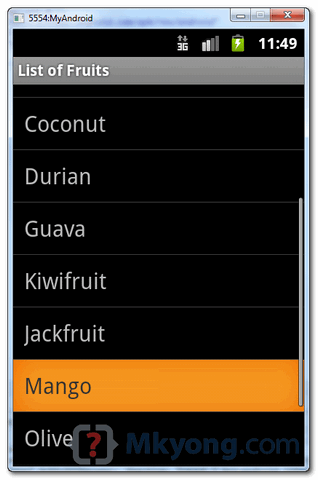
In this example, we show you how to display a list of fruit name via ListView, it should be easy and self-explanatory.
1.1 Android Layout file
File : res/layout/list_fruit.xml
<?xml version="1.0" encoding="utf-8"?>
<TextView xmlns:android="http://schemas.android.com/apk/res/android"
    android:layout_width="fill_parent"
    android:layout_height="fill_parent"
    android:padding="10dp"
    android:textSize="20sp" >
</TextView>
1.2 ListView
package com.mkyong.android;

import android.app.ListActivity;
import android.os.Bundle;
import android.view.View;
import android.widget.AdapterView;
import android.widget.ArrayAdapter;
import android.widget.ListView;
import android.widget.TextView;
import android.widget.Toast;
import android.widget.AdapterView.OnItemClickListener;

public class ListFruitActivity extends ListActivity {

	static final String[] FRUITS = new String[] { "Apple", "Avocado", "Banana",
			"Blueberry", "Coconut", "Durian", "Guava", "Kiwifruit",
			"Jackfruit", "Mango", "Olive", "Pear", "Sugar-apple" };

	@Override
	public void onCreate(Bundle savedInstanceState) {
		super.onCreate(savedInstanceState);

		// no more this
		// setContentView(R.layout.list_fruit);

		setListAdapter(new ArrayAdapter<String>(this, R.layout.list_fruit,FRUITS));

		ListView listView = getListView();
		listView.setTextFilterEnabled(true);

		listView.setOnItemClickListener(new OnItemClickListener() {
			public void onItemClick(AdapterView<?> parent, View view,
					int position, long id) {
			    // When clicked, show a toast with the TextView text
			    Toast.makeText(getApplicationContext(),
				((TextView) view).getText(), Toast.LENGTH_SHORT).show();
			}
		});

	}

}
1.3 Demo
2. Custom ArrayAdapter example
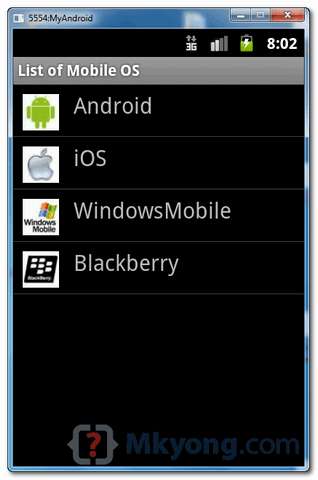
In this example, we show you how to create 4 items in the ListView, and use a custom “ArrayAdapter” to display different images base on the “item name” in the list.
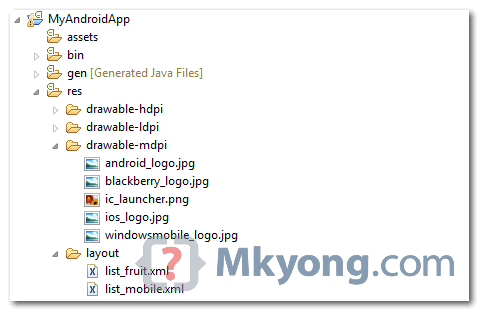
2.1 Images
Get 4 images for demonstration.
2.2 Android Layout file
File : res/layout/list_mobile.xml
<?xml version="1.0" encoding="utf-8"?>
<LinearLayout xmlns:android="http://schemas.android.com/apk/res/android"
    android:layout_width="wrap_content"
    android:layout_height="wrap_content"
    android:padding="5dp" >

    <ImageView
        android:id="@+id/logo"
        android:layout_width="50px"
        android:layout_height="50px"
        android:layout_marginLeft="5px"
        android:layout_marginRight="20px"
        android:layout_marginTop="5px"
        android:src="@drawable/windowsmobile_logo" >
    </ImageView>

    <TextView
        android:id="@+id/label"
        android:layout_width="wrap_content"
        android:layout_height="wrap_content"
        android:text="@+id/label"
        android:textSize="30px" >
    </TextView>

</LinearLayout>
2.3 Custom ArrayAdapter
Create a class extends ArrayAdapter and customize the item display in the getView() method.
package com.mkyong.android.adaptor;

import com.mkyong.android.R;

import android.content.Context;
import android.view.LayoutInflater;
import android.view.View;
import android.view.ViewGroup;
import android.widget.ArrayAdapter;
import android.widget.ImageView;
import android.widget.TextView;

public class MobileArrayAdapter extends ArrayAdapter<String> {
	private final Context context;
	private final String[] values;

	public MobileArrayAdapter(Context context, String[] values) {
		super(context, R.layout.list_mobile, values);
		this.context = context;
		this.values = values;
	}

	@Override
	public View getView(int position, View convertView, ViewGroup parent) {
		LayoutInflater inflater = (LayoutInflater) context
			.getSystemService(Context.LAYOUT_INFLATER_SERVICE);

		View rowView = inflater.inflate(R.layout.list_mobile, parent, false);
		TextView textView = (TextView) rowView.findViewById(R.id.label);
		ImageView imageView = (ImageView) rowView.findViewById(R.id.logo);
		textView.setText(values[position]);

		// Change icon based on name
		String s = values[position];

		System.out.println(s);

		if (s.equals("WindowsMobile")) {
			imageView.setImageResource(R.drawable.windowsmobile_logo);
		} else if (s.equals("iOS")) {
			imageView.setImageResource(R.drawable.ios_logo);
		} else if (s.equals("Blackberry")) {
			imageView.setImageResource(R.drawable.blackberry_logo);
		} else {
			imageView.setImageResource(R.drawable.android_logo);
		}

		return rowView;
	}
}
2.4 ListView
ListView, but use above custom adapter to display the list.
package com.mkyong.android;

import com.mkyong.android.adaptor.MobileArrayAdapter;
import android.app.ListActivity;
import android.os.Bundle;
import android.widget.ListView;
import android.widget.Toast;
import android.view.View;

public class ListMobileActivity extends ListActivity {

	static final String[] MOBILE_OS =
               new String[] { "Android", "iOS", "WindowsMobile", "Blackberry"};

	@Override
	public void onCreate(Bundle savedInstanceState) {
		super.onCreate(savedInstanceState);

		setListAdapter(new MobileArrayAdapter(this, MOBILE_OS));

	}

	@Override
	protected void onListItemClick(ListView l, View v, int position, long id) {

		//get selected items
		String selectedValue = (String) getListAdapter().getItem(position);
		Toast.makeText(this, selectedValue, Toast.LENGTH_SHORT).show();

	}

}
2.5 Demo

what is the maximum list views can we add in a activity???
how to one activty intent listview adapter using html file
Thank you for this tutorial. This solved my android problem.
any one plz tell how to develop list-view? i developed the app which scans the document..so i want to design listview accordingly..
Hello.. i have a project on android system parking management .The Requirement of my project are
1. how to write the xml code for parking slot area..
2.The total number of slot should be 8..
plzzz help me….
Hero
thanks
How can i pop up a dialog box with contents loaded from a text file when someone clicks on an item in the list view?
Hi…I am developing Quiz application, I added dynamic Radio Group with Dynamic Radio button..Each Row have Four Radio button with inside of Radio Groups But i got an issue as same as following link..https://groups.google.com/forum/#!original/vogella/oIYo9yMmKFY/fDlTWBHajZAJ..Would u like to help me?..My Mail id : [email protected]
HOW TO OPEN A NEW activity on listview click with its detail but it be from mysql database.
Naming arguments the same as private variables seems like a bad idea to me. It may work, but it just seems like bad practice.
Can someone pleasehelp me how do i add this list view in a widget to display the fuit names?
hi could you explain what means in this line of code: “setListAdapter(new ArrayAdapter(this, R.layout.list_fruit,FRUITS));”
you are using an adapter which takes string type objects.
sir plz tell me about base adapter why we use it and example
Hi
Mkyong
can we change color of List Items By Coding in Java Class.
Thanks in advance!
Can you please tell me how to set clicklistener to each listview item? I want mij each item to nagivate to different pages.
Right now I wrote the following code that all items go to the same page:
list.setOnItemClickListener(new OnItemClickListener() {
public void onItemClick(AdapterView arg0, View arg1, int position,
long arg3) {
startActivity(new Intent(Participant.this,Contact.class));
}
});
Hi, nice tutorial!
Can you please explain, how to change to color of some rows of the listview?
I can change the color of the whole listview, but I don’t know how change
the color of a specified row.
I want to have several blocks in my listview.
Every block has an integer ID.
The row between two blocks should have another color (like a separator).
Could you please help?
Thanks!
sir, I have spinner that bind with custom ArrayAdapter (id,name).
i want to set spinner position with id and display name in spinner(id is hidden).
thanks very much mkyong
your web is very good and helped me
at last I got it right… the mistake was in manifest.xml
thank you mkyoung
After successfully running the code I get “Unfortunately, the app has stopped”. Any solutions or helpful information to help me solve this?
View rowView = convertView;
if (rowView == null) {
LayoutInflater inflater = (LayoutInflater) context.getSystemService(Context.LAYOUT_INFLATER_SERVICE);
rowView = inflater.inflate(R.layout.item_menu, parent, false);
}
use this code in custom listview
no errors are there but the code is not running…
what I have to change.. help me??
package com.holy.goly;
import com.listview.lively.MainActivity;
import android.app.ListActivity;
import android.os.Bundle;
import android.widget.ListView;
import android.widget.Toast;
import android.view.View;
public class Lone extends ListActivity {
static final String[] MOBILE_OS =
new String[] { “Android”, “iOS”, “WindowsMobile”, “Blackberry”};
@Override
public void onCreate(Bundle savedInstanceState) {
super.onCreate(savedInstanceState);
setListAdapter(new MainActivity(this, MOBILE_OS));
}
@Override
protected void onListItemClick(ListView l, View v, int position, long id) {
//get selected items
String selectedValue = (String) getListAdapter().getItem(position);
Toast.makeText(this, selectedValue, Toast.LENGTH_SHORT).show();
}
}
i want listview program
package com.example.mygame;
import com.example.mygame.R.id;
import android.app.ListActivity;
import android.content.Intent;
import android.os.Bundle;
import android.view.View;
import android.view.View.OnClickListener;
import android.widget.AdapterView;
import android.widget.ArrayAdapter;
import android.widget.TextView;
import android.widget.Toast;
import android.widget.Button;
import android.widget.ListView;
import android.widget.AdapterView.OnItemClickListener;
public class SecondActivity extends ListActivity implements OnClickListener
{
Button b3, shake;
/*ListView listview;
static final String[] numbers = new String[] {
“one”, “two”, “three”, “four”, “five”,
“six”, “seven”, “eight”, “nine”, “ten”,
“eleven”, “twelve”, “thirteen”, “fourteen”,
“fifteen”,”sixteen”,”seventeen”,”eighteen”,
“nineteen”,”twenty”,”twenty one”,”twenty two”
};*/
protected void onCreate(Bundle savedInstanceState) {
super.onCreate(savedInstanceState);
setContentView(R.layout.activity_second);
b3=(Button)findViewById(R.id.button3);
shake=(Button)findViewById(R.id.button7);
b3.setOnClickListener(this);
shake.setOnClickListener(this);
/*listview = (ListView) findViewById(R.id.action_settings);
ArrayAdapter adapter = new ArrayAdapter
(this,android.R.layout.simple_list_item_1, numbers);
listview.setAdapter(adapter);
listview.setOnItemClickListener(new OnItemClickListener() {
public void onItemClick(AdapterView parent, View v,
int position, long id) {
Toast.makeText(getApplicationContext(),
((TextView) v).getText(), Toast.LENGTH_SHORT).show();
}
});
*/
}
public void onClick(View v) {
switch (v.getId()) {
case R.id.button3:
Intent Home= new Intent(SecondActivity.this,FirstActivity.class);
startActivity(Home);
break;
case R.id.button7:
Intent shake= new Intent(SecondActivity.this,ThirdActivity.class);
startActivity(shake);
break;
default:
break;
}
}
}
i develop this program but i cant open the list view if you have answer reply me
tnx alot
hey! nice job!
but you should check the convertView before making a new rowView.
Nima Ahmadi you’re right. Here is the modified code:
View rowView = convertView;
if (rowView == null) {
LayoutInflater inflater = (LayoutInflater) context.getSystemService(Context.LAYOUT_INFLATER_SERVICE);
rowView = inflater.inflate(R.layout.item_menu, parent, false);
}
I am new to android,this code is not running can some one help me…?
where to insert this code exactly??
THANK YOU SO MUCH! I’ve been looking for an easy tutorial like yours for a while!! Thank you dude! Good job!
nice coding, i likes
THANK YOU