In Java, we use FileInputStream to read bytes from a file, such as an image file or binary file.
Topics
- FileInputStream – Read a file
- FileInputStream – Remaining bytes
- FileInputStream – Better performance
- FileInputStream vs BufferedInputStream
- InputStreamReader – Convert FileInputStream to Reader
- FileInputStream – Read a Unicode file
Note
However, all the below examples use FileInputStream to read bytes from a text file and print them out. The text file allows readers to "see" the output correctly. Generally, we use Reader to read characters from a text file.
1. FileInputStream – Read a file
This example uses FileInputStream to read bytes from a file and print out the content. The fis.read() reads a byte at a time, and it will return a -1 if it reached the end of the file.
package com.mkyong.io.api.inputstream;

import java.io.File;
import java.io.FileInputStream;
import java.io.IOException;

public class FileInputStreamExample1 {

    public static void main(String[] args) {
        readFile("c:\\test\\file.txt");
    }

    private static void readFile(String fileName) {

        try (FileInputStream fis = new FileInputStream(new File(fileName))) {
            int content;
            // reads a byte at a time, if it reached end of the file, returns -1
            while ((content = fis.read()) != -1) {
                System.out.println((char)content);
            }
        } catch (IOException e) {
            e.printStackTrace();
        }

    }

}
2. FileInputStream – Remaining bytes
We can use fis.available() to check the remaining bytes that can be read. For example:
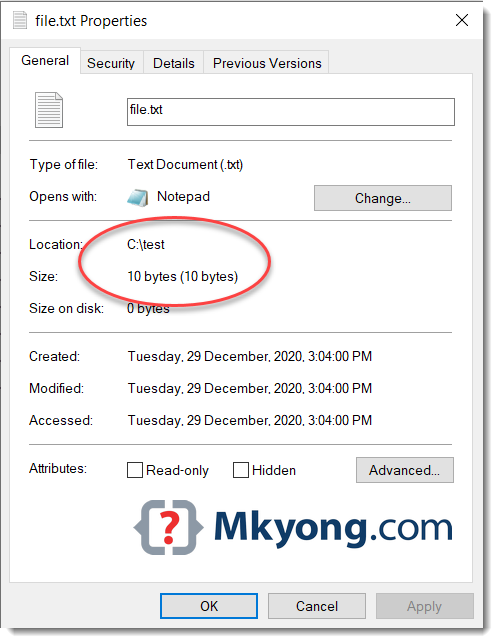
Below is a text file containing 10 bytes.
mkyong.com
package com.mkyong.io.api.inputstream;

import java.io.File;
import java.io.FileInputStream;
import java.io.IOException;

public class FileInputStreamExample2 {

    public static void main(String[] args) {
        readFile("c:\\test\\file.txt");
    }

    private static void readFile(String fileName) {

        try (FileInputStream fis = new FileInputStream(new File(fileName))) {

            // remaining bytes that can be read
            System.out.println("Remaining bytes that can be read : " + fis.available());

            int content;
            // reads a byte at a time, if end of the file, returns -1
            while ((content = fis.read()) != -1) {
                System.out.println((char) content);

                System.out.println("Remaining bytes that can be read : " + fis.available());
            }
        } catch (IOException e) {
            e.printStackTrace();
        }

    }

}
Output
Remaining bytes that can be read : 10
m
Remaining bytes that can be read : 9
k
Remaining bytes that can be read : 8
y
Remaining bytes that can be read : 7
o
Remaining bytes that can be read : 6
n
Remaining bytes that can be read : 5
g
Remaining bytes that can be read : 4
.
Remaining bytes that can be read : 3
c
Remaining bytes that can be read : 2
o
Remaining bytes that can be read : 1
m
Remaining bytes that can be read : 0
For a file containing 10 bytes file, the fis.read() will run ten times and read a byte for each time. (See the problem here?)
3. FileInputStream – Better performance
3.1 Review the FileInputStream#read() source code, each read() will call the native method to read a byte from the disk.
package java.io;

public class FileInputStream extends InputStream {

    /**
     * Reads a byte of data from this input stream. This method blocks
     * if no input is yet available.
     *
     * @return     the next byte of data, or <code>-1</code> if the end of the
     *             file is reached.
     * @exception  IOException  if an I/O error occurs.
     */
    public int read() throws IOException {
        return read0();
    }

    private native int read0() throws IOException;

    //...
}
3.2 We can use the read(byte b[]) to read predefined bytes into a byte array; it will significantly increase the read performance.
package com.mkyong.io.api.inputstream;

import java.io.File;
import java.io.FileInputStream;
import java.io.IOException;
import java.nio.charset.StandardCharsets;

public class FileInputStreamExample3 {

    public static void main(String[] args) {
        readFileBetterPerformance("c:\\test\\file.txt");
    }

    private static void readFileBetterPerformance(String fileName) {

        try (FileInputStream fis = new FileInputStream(new File(fileName))) {

            // remaining bytes that can be read
            System.out.println("Remaining bytes that can be read : " + fis.available());

            // 8k a time
            byte[] bytes = new byte[8192];

            // reads 8192 bytes at a time, if end of the file, returns -1
            while (fis.read(bytes) != -1) {

                // convert bytes to string for demo
                System.out.println(new String(bytes, StandardCharsets.UTF_8));

                System.out.println("Remaining bytes that can be read : " + fis.available());
            }
        } catch (IOException e) {
            e.printStackTrace();
        }

    }

}
The above example will read 8192 bytes at a time, and for a file containing 10 bytes, it reads only one time.
Remaining bytes that can be read : 10
mkyong.com
Remaining bytes that can be read : 0
Note
For example, if a file containing 81920 bytes (80 kb), the default fis.read will require an 81920 native calls to read all bytes from the file; While the fis.read(bytes) (for a size of 8192), we only need 10 native calls. The difference is enormous.
4. FileInputStream vs BufferedInputStream
The FileInputStream reads a byte at a time, and each read() will be a native read from the disk. For reading a large file, it will slow.
The BufferedInputStream reads 8192 bytes (default) at a time and buffers them until they are needed; The BufferedInputStream#read() still returns a single byte at a time, but other remaining bytes are in the buffer and reserved for the next read. The concept is similar to the above FileInputStreamExample3.java
The common practice uses BufferedInputStream to wrap the FileInputStream to provide a buffer cache to increase the read performance.
package com.mkyong.io.api.inputstream;

import java.io.BufferedInputStream;
import java.io.File;
import java.io.FileInputStream;
import java.io.IOException;

public class FileInputStreamExample4 {

    public static void main(String[] args) {
        readFileBetterPerformance2("c:\\test\\file.txt");
    }

    private static void readFileBetterPerformance2(String fileName) {

        try (BufferedInputStream bis =
                     new BufferedInputStream(
                             new FileInputStream(new File(fileName)))) {

            // remaining bytes that can be read
            System.out.println("Remaining bytes that can be read : " + bis.available());

            int content;
            // reads 8192 bytes at a time and buffers them until they are needed,
            // if end of the file, returns -1
            while ((content = bis.read()) != -1) {

                // convert bytes to string for demo
                System.out.println((char) content);

                System.out.println("Remaining bytes that can be read : " + bis.available());
            }
        } catch (IOException e) {
            e.printStackTrace();
        }

    }

}
Output
Remaining bytes that can be read : 10
m
Remaining bytes that can be read : 9
k
Remaining bytes that can be read : 8
y
Remaining bytes that can be read : 7
o
Remaining bytes that can be read : 6
n
Remaining bytes that can be read : 5
g
Remaining bytes that can be read : 4
.
Remaining bytes that can be read : 3
c
Remaining bytes that can be read : 2
o
Remaining bytes that can be read : 1
m
Remaining bytes that can be read : 0
5. Convert FileInputStream to Reader
It’s also common to use InputStreamReader to convert InputStream to a Reader.
This example shows how to convert a FileInputStream to BufferedReader, and read it line by line.
private static void readFileBetterInputStreamReader(String fileName) {

    try (BufferedReader br =
                 new BufferedReader(
                         new InputStreamReader(
                                 new FileInputStream(new File(fileName))))) {

        String line;
        while ((line = br.readLine()) != null) {
            System.out.println(line);
        }

    } catch (IOException e) {
        e.printStackTrace();
    }

}
6. FileInputStream – Read a Unicode file
This example uses FileInputStream to read a Unicode file. For example:
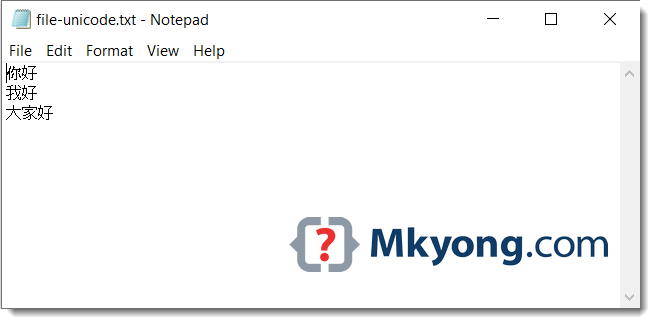
A Unicode file containing a few Chinese characters, and each Unicode code character contains two or more bytes.
你好
我好
大家好
We can use the above example 3 to read the Unicode file and print them correctly.
  private static void readFileBetterPerformance(String fileName) {

      try (FileInputStream fis = new FileInputStream(new File(fileName))) {

          // remaining bytes that can be read
          System.out.println("Remaining bytes that can be read : " + fis.available());

          // 8k a time
          byte[] bytes = new byte[8192];

          // reads 8192 bytes at a time, if end of the file, returns -1
          while (fis.read(bytes) != -1) {

              // convert bytes to string for demo

              // convert bytes unicode to string
              System.out.println(new String(bytes, StandardCharsets.UTF_8));

              System.out.println("Remaining bytes that can be read : " + fis.available());
          }
      } catch (IOException e) {
          e.printStackTrace();
      }

  }
Output
Remaining bytes that can be read : 25
你好
我好
大家好
Remaining bytes that can be read : 0
Furthermore, we also can use the example 5 InputStreamReader to read and print the Unicode file, by default the InputStreamReader has a default charset of UTF-8.
Download Source Code
$ git clone https://github.com/mkyong/core-java
$ cd api/inputstream

thanks mkyong!
I am not sure, but using this can be more appropriate
System.out.print((char) content); is for ASCII characters. ASCII characters are represented with 1 byte. But Unicode characters two or more bytes.
for Unicode characters:
byte[] array = new array[fis.available()];
fis.read(array);
System.out.println(new String(array));//It can read Unicode characters
The first example should be
The “FileInputStream – Better performance” example will have a problem if a multi-byte UTF-8 character straddles a 8192 boundary. Change it to not convert to String. Change it to write the number of bytes that were read.
how to avoid input path canonicalized security vulnerabilities in java
String dir = System.getProperty(“config.file”);
Excelent!! thank you very much..
Nice post but can I have some simple examples?
Article is updated with more examples, hope you like it.